
Redist Checker Pro
The Swiss Army Knife for Windows Runtimes & System Info
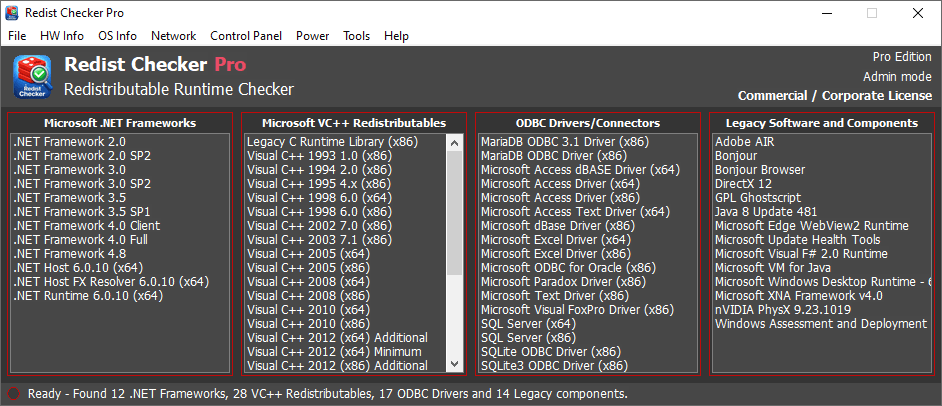
Scans for installed .NET Framework runtimes, VC++ Redistributables,ODBC Drivers and Connectors, legacy software and components, and many more. Perfect for IT professionals, legacy system maintainers, software developers, and gamers.
A lightweight utility that works everywhere.
Payment secured by

Latest Version: 2.5.0 File Size: 233KB
MD5: 3cb111147482a820d826952725a139e4
Downloads as ZIP. Extract, verify against MD5 and run.
Instant delivery No subscription No hidden fees No registration required
Supports Windows 2000, XP, Vista, 7, 8, 10 and 11 | 233KB single standalone executable file | No installation needed | No dependencies
| Features | Lite Edition (Free) | Pro Edition (Paid) |
|---|---|---|
| Total items displayed | All items | All items |
| Tip: Double-click any listed item to search Google for additional information. | ||
| .NET Framework detection | Full list | Full list |
| VC++ Redistributables detection | Full list | Full list |
| ODBC Drivers/Connectors detection | Full list | Full list |
| Legacy Software and Components detection | Full list | Full list |
| File menu > Export As... | Full report (TXT) | Full report (TXT/CSV/JSON/XML/HTM) |
| HW Info menu (Hardware Information) | Full access | Full access |
| OS Info menu (Operating System Information) | Full access | Full access |
| Network menu (Network related Information & Tools) | Pro feature | Full access |
| Control Panel menu (Legacy Control Panel items) | Pro feature | Full access |
| Note: The legacy "Display Properties" dialog window was removed in Windows 10 and later. | ||
| Note: The legacy "System Properties" window was redirected in a recent Windows 11 update. | ||
| Power menu | Limited | Full access |
| Tools menu | Full access | Full access |
| CLI Support (Power options) | Pro feature | Full access |
| Note: Forced actions (Log Off, Restart, Shutdown, Power Off) close all applications immediately. Any unsaved work will be lost. No confirmation dialog appears in CLI mode. | ||
| Windows 2000 → 11 compatible | ||
| No installation / Single standalone EXE | ||
| Lifetime updates (Auto-update notification) | Pro feature | Included |
| License | Personal / Home | Commercial / Corporate |